
Chinese Input on Android 2.1 (HTC Desire)
It took a bit to sort it out, but once you know how turning on and using Chinese input on Android 2.1 is very nice. Here is a quick movie showing how to install, enable, and use Chinese input using the HTC Desire (it should be the same for any Android 2.1 phone I would guess)
[Watch on YouTube](http://www.youtube.com/watch?v=I2w0gM5Tz7o)HSK Basic Study Aids
I’ve been studying Mandarin as a hobby for a few years now, but I’ve decided to step it up a bit this year. As part of one of my goals for 2010, I am going to take the HSK Basic test.
While passing the HSK Basic would be a big boost for me, in the grand scheme of things passing the basic test means one simply has a solid base to really begin learning Mandarin. For example, to pass the Basic test you only have to know somewhere between 800 to 1000 characters - for perspective you need to know about 3,500 to read a newspaper. So passing the basic tests really means “you are ready to begin learning”.
YASnippet Emacs Snippets - Like Textmate
I’ve gone back to Emacs for all my text processing needs for some reason. Well, I think the main reason was I’ve been going back and forth between Linux, Mac, and Windows on my latest project at work, and there wasn’t a common editor between all three that I liked… save my old friend Emacs.
I’ve always used emacs for one thing or another, but I’ve grown very used to Textmate on the Mac for coding. One of Textmate’s strong points is snippets. Once I got used to having them, it has become difficult to live without them. Enter YASnippets - snippets for Emacs that look, feel, work, and use the same syntax as Textmate snippets. Score.
Adventures in CSS2 Font Embedding
CSS2 (or maybe it’s CSS3 - who can keep up) lets you embed fonts into style sheets for use on your HTML pages. Since all modern browsers now support true type font embedding (that’d be Firefox 3.5, Safari 4, Chrome(?), and Opera 9), I figured I take a stab at it to see how practical it was.
I think in the long run this is going to be a boon for designers. I can’t count the number of times I’ve seen a designer get bummed over the “web safe font” selection. And for the most part, font embedding actually works.
CFML in gEdit (The Ubuntu Text Editor)
I’ve finished moving the basics of my work system from Mac to Ubuntu 9. Here is a screen shot of my desktop.
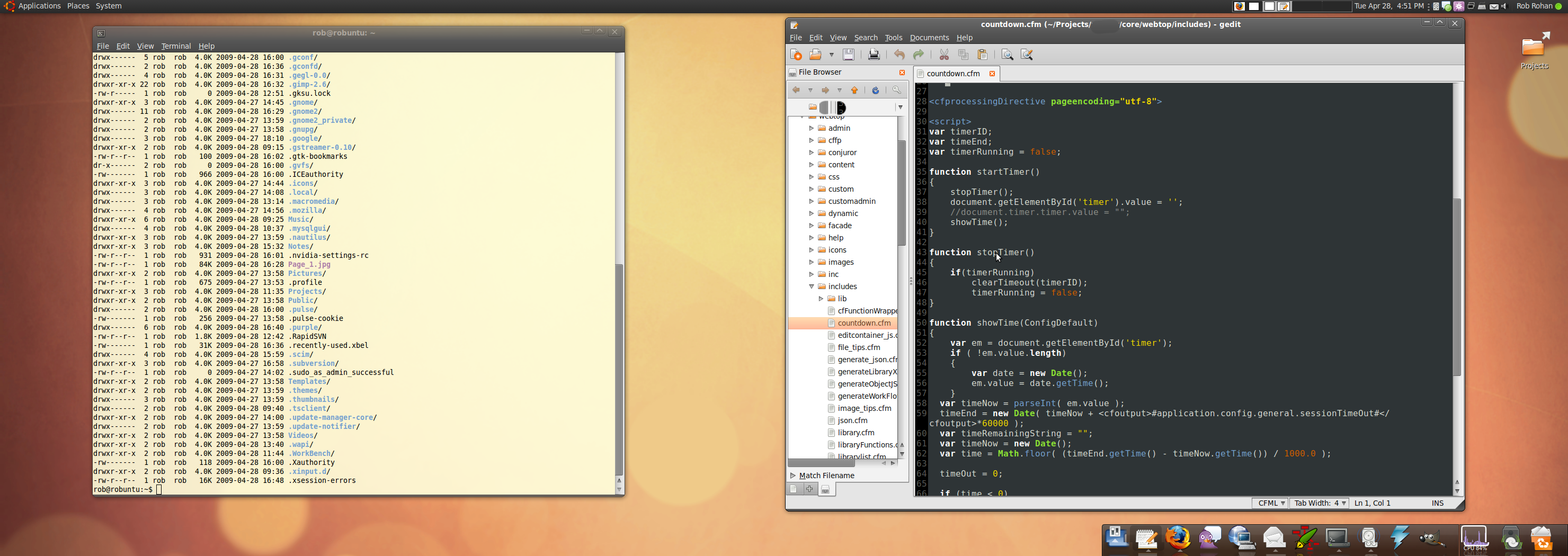
I put the system together from unused computer parts laying around the office. This would be considered an underpowered system by most people’s standards, but it runs well - even the dual monitors and eye candy work seamlessly. It probably wouldn’t do video editing very well, but it’s powerful enough to run everything need, and doesn’t skip a beat.
Import a Git repo into Subversion
Yeah, I know it’s backwards.
When I start working on a new wild code idea, I often start out with a Git repository. If the idea goes no where, it’s an easy delete. If it turns out to be great, well, I already have a repo going and ready to share. On top of the ease of use and personal nature of a Git repository, I am also a bit of a Git fanboy so by default I often choose Git.
DIY iPhone Stylus - the "Free Capacitive Stylus"
There are a few select times when having a stylus for your iPhone can come in handy. For me, I sometimes want to practice writing Chinese characters on my iPhone, and using my finger seems a silly way to do that. Another good instance is if you like to draw, it’s often more natural to use a pen than your finger (unless you are in pre-school of course).
I looked around a bit and found that you can buy a stylus for your iPhone if you are so inclined. However, but being the frugal, I-wanna-make-it-myself guy, I decided to build my own. Plus, the pre-made versions look like they are built for a small foot print, and I want a pen sized stylus.
Compressing A UUID
FarCry makes heavy use of UUIDs. I am a fan of UUIDs myself, but in some instances they are a bit long. It seems like there should be a way to make them shorter and still have them hold their value. I had a need for a shorter UUID and set out to find a way to compress a UUID.
It kind of worked. It wont work for my purposes so it was a wash for me, but it was still quite a bit of fun and I figured I might as well get a blog post out of all the work.
Saving a Customised Linux Amazon Instance (EC2 and S3)
In my last post about playing around with EC2, I showed signing up for Amazon’s service and using Firefox’s Elasticfox to bring up AMIs. This bit is about how to take that running instance and save it to S3.
The workflow being, you bring up an AMI, install a bunch of software, configure it how you need it, and then you need to store your new image so you can bring it up again and again (since images will revert back to their saved state after shutdown).
DIY Whiteboard For $3.00
Like most geeks, I love whiteboards. I like it for doing quick UMLs or to just quickly get ideas out (I don’t like them when used for power trips during interviews though - thank you very much).
Also, for some reason, love to practice my Chinese characters on a whiteboard. The big whiteboard pen is closer to a 毛笔 than a normal ball point pen, but takes less effort to use (the ink, the clean up, etc).
« Newer Older »